Posts

How to increase decrease navbar height in Bootstrap? Twitter bootstrap navbar fixed top overlapping site?

Just change the min-height: to what you want it to be. For example: 50px . navbar - nav > li > a { padding - top : 5px ! important ; padding - bottom : 5px ! important ;} . navbar { min - height : 50px ! important } If you are on a template with a navbar which is fixed to top, you have to modify another thing. Go to your CSS File and change the body padding to also 50px. body { padding-top : 50 px ; } Good read: navbar-fixed-top-bootstrap
How to SSH from Mac? How to SSH from Windows? How to change the user in SSH?

How to SSH from Mac? How to change the user in SSH? Spotlight -> Type Terminal. in the now open Terminal type ssh 192.168.1.1 -l USERNAME While you don't type USERNAME but the User you want to connect with. I always forget it, and then you try to authenticate with your remote mashines User. How to SSH from Windows?  How to change the user in SSH? Download PuTTY - a free SSH and telnet client for Windows. Open Putty ssh 192.168.1.1 -l USERNAME While you don't type USERNAME but the User you want to connect with. I always forget it, and then you try to authenticate with your remote mashines User.

How to add trusted sites in Chrome?

If you get these messages Google protects you from an untrustworthy site: This is probably not the site you are looking for! The site's security certificate is not trusted! The site's security certificate has expired! The server's security certificate is revoked! I ran into a web socket problem lately with a EdgeMax Router, where I knew that I can trust the site http://192.168.1.1. Here is how to add any site to the trusted sites: Type chrome://settings/ into your browsers adress bar. Show Advanced Settings (Bottom of the Page) Network -> Proxy. There you can add your trusted site.

How to add trusted plugins in Chrome? How to always allow a plugin? How to always allow Folx?

How to add trusted plugins in Chrome? How to always allow a plugin? How to always allow Folx? Please don't if you are not sure about why you want to do this. I recently had to, because Chrome asked me every time I wanted to download something if Folx 3 could be trusted ( a Download Manager for Mac ). Always up to date guide: https://support.google.com/chrome/answer/142064?hl=en Type chrome://plugins/ in your Browsers Adress Bar check always allow.

How to Download Public Domain Books Straight to your Kindle

Image
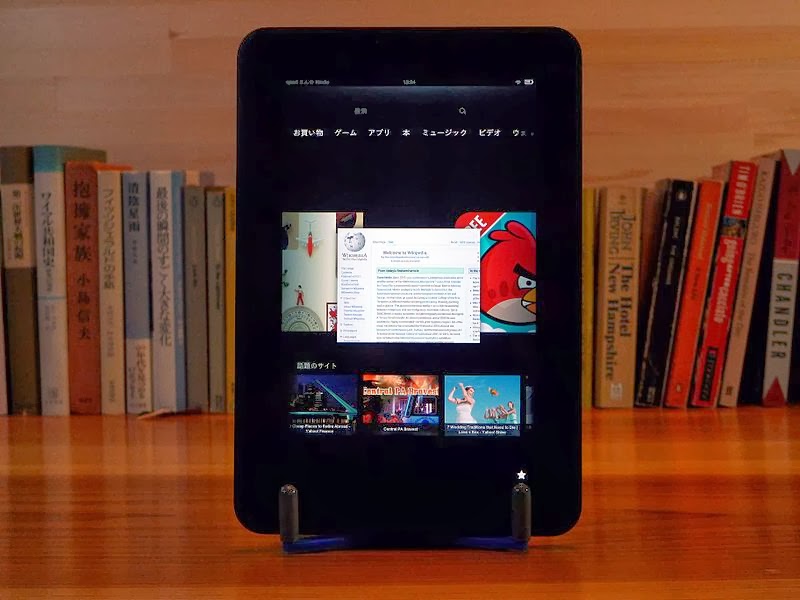
Your Kindle does support many other formats you just need to get them on your device: Kindle (AZW), KF8, TXT, PDF, unprotected MOBI, PRC natively, Audible Enhanced format (AAX), DOC, DOCX, JPEG, GIF, PNG, BMP, Dolby Digital (AC-3), Dolby Digital Plus (E-AC-3), non-DRM AAC, MP3, MIDI, PCM/WAVE, OGG, WAV, M4V, MP4, AAC LC/LTP, HE-AACv1, HE-AACv2, MKV, AMR-NB, AMR-WB, HTML5, CSS3, 3GP, VP8 (WEBM) How to Download Public Domain Books Straight to your Kindle Go to Projekt Gutenberg and find digital versions of most books published before 1923. Download the Kindle Format *.mobi If you followed the blog post about speeding up your Google Chrome you have to deactivate the data compression proxy, otherwise you can't download files Please follow these instructions  on  your Kindle Fire: Your Books are now in your Downloads folder, you need to put them in your Books folder, then they’ll appear under your Books tab. You can use a free app like " ES File Explorer " to mov...

Connect a Monitor to a Mac or Macbook via Thunderbolt and save 85%

Image
Did you know that an Apple Thunderbolt Cable is exactly the same as a Mini Displayport cable - when it comes to connecting a monitor? Connect a Monitor to a Mac or Macbook via Thunderbolt and save 85% You can decide if you want to spend 39$ 39€ £35.00 or: ~ 6 USD Monoprice 6ft 32AWG Mini DisplayPort Cable - White (Amazon United States) ~ 12 GBP Belkin 1.5m Mini Display Port to Mini Display Port Adapter (Amazon United Kingdom) ~ 12 EUR Hama Mini-DisplayPort-Anschlusskabel 1,5m (Amazon Deutschland) If you are German or English, you can decide between Amazon UK and Amazon Deutschland. Consider the shipping.

How to Merge, Combine multiple .csv files Mac OS X

Open the Terminal, go to the folder, where your files are: cat *.csv >merged.csv All files get merged into merged.csv without any installation of a third party programm. Enjoy.